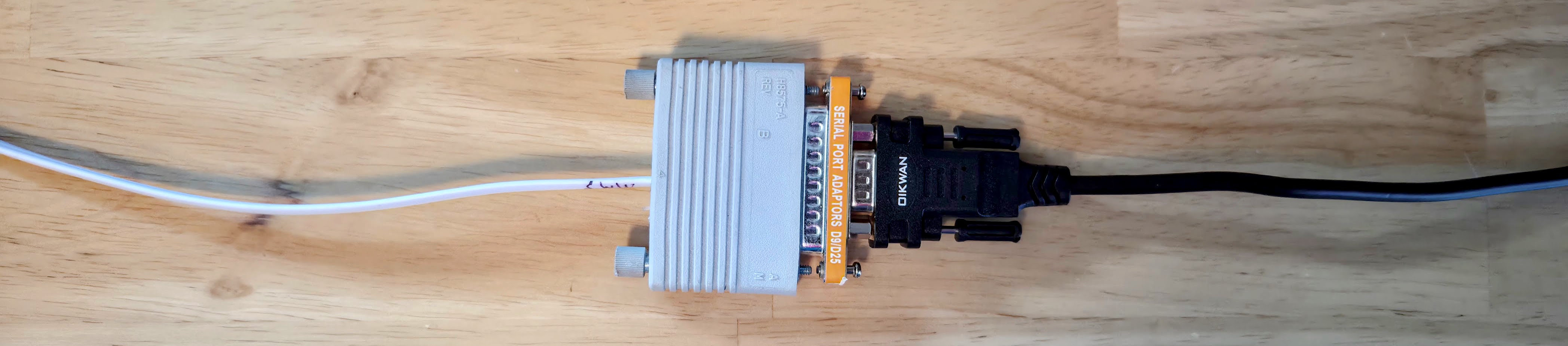
The VAXstations I have all connect to the outside world through a DEC MMJ port.
This is a 6-pin/6-conductor cable very similar to an RJ12, but with the tab offset. Apparently Thrustmaster uses a similar jack on some of its devices.
The standard MMJ cable is a “crossover” cable, the pins on one end are offset from the pins on the other end. A straight through cable can also be used, but would require an additional “null modem” adapter if you’re using it as a serial port.
I’ve gotten the necessary crimp tools/dies and parts to make my own cables, but unfortunately I have had no success so far for reasons yet to be determined.
There are also DECserver terminal servers that use RJ45 ports. To use these with MMJ I will try making some custom cables again.
To use these with DB25 serial, you need an adapter. I got a bunch
of DEC H8575-A adapters from MMJ to DB25.
If you’re using a VT320 or VT420, you can just use the (crossover) MMJ cable directly.
On the VAXstations, because they are normally intended to be used with a mouse/keyboard/monitor, there is a switch you have to set to make it boot and operate from the serial port “headlessly.”
Furthermore, I have found that at least on some of my VAXen, when
I disconnect the serial cable it sends a serial break and causes
the system to drop to it’s equivalent of BIOS, with a >>> prompt.
So, I try not to do that.
Online Sources
There are also apparently places you can buy RJ45 to MMJ cables pre-made.
I’ve found a few sources for MMJ cables as well; I’ve put in orders from a place on eBay in the UK but you have to tell them to make the cables cross-over instead of straight.
Keyboard and Mouse
You can actually see the serial ports in action. The keyboard is easier, because it just sends data at 4800 baud, 8N1.
Configure
TTA0:for 4800 baud and 8-bit input:$ SET TERMINAL /PERMANENT /SPEED=4800 /EIGHTBIT /TYPE_AHEAD /NOECHO TTA0:Connect to the keyboard port using OpenVMS’s native pass-through utility (
DTEPAD):$ SET HOST/DTE/ESCAPE="P" TTA0:- Any bytes received from the keyboard (power-up self-test burst or keypress scancodes) will appear immediately on your terminal.
- To exit back to the DCL prompt, press
Ctrl-P(or if/ESCAPEis omitted, the default isCtrl-\).
The mouse is more complex, as it has two way communication, and uses odd parity.
SET HOST/DTE provides a full-duplex transparent serial link,
so any character typed on the terminal while connected is transmitted directly
out TTA1: to the mouse. The standard DEC mouse protocol commands can be
sent to test it:
T(hex0x54): Self-Test. Commands the mouse to execute its internal self-test. It immediately replies with a 4-byte status packet:- Byte 1: Status header (
0xA0, bit 5 set indicates self-test complete) - Byte 2: Error code / revision
- Byte 3: Error code
- Byte 4: Device identifier (
0x02for mouse,0x04for graphics tablet) TypingTwill immediately dump this 4-byte burst to the screen.
- Byte 1: Status header (
R(hex0x52): Incremental Stream Mode. Switches the mouse into continuous streaming mode. Once in stream mode, whenever the mouse is moved or a button is pressed or released, it transmits a 3-byte movement report:- Byte 1: Sync bit (
Bit 7 = 1) and button states (Bit 2 = Left,Bit 1 = Middle,Bit 0 = Right), plus sign/overflow bits. - Byte 2: Delta X motion.
- Byte 3: Delta Y motion.
After typing
R, moving the mouse or clicking its buttons will continuously dump 3-byte packets to the screen.
- Byte 1: Sync bit (
D(hex0x44): Prompt Mode. Stops streaming mode and returns the mouse to idle/polled mode.P(hex0x50): Poll Position. Requests a single 3-byte position report in Prompt Mode.
Here’s how to see it in action:
Configure
TTA1:for 4800 baud, odd parity, and 8-bit input:$ SET TERMINAL /PERMANENT /SPEED=4800 /PARITY=ODD /EIGHTBIT /TYPE_AHEAD /NOECHO TTA1:Connect to the mouse port using
SET HOST/DTE:$ SET HOST/DTE/ESCAPE="P" TTA1:Interact with the mouse:
- Type
T(capital T): Verify that a 4-byte self-test response appears. - Type
R(capital R): Switch to streaming mode. Move the mouse and click each button; verify that byte streams appear with every motion and click. - Type
D(capital D): Switch back to prompt mode (streaming stops).
- Type
Disconnect:
- Press
Ctrl-Pto exitDTEPADand return to the$DCL prompt.
- Press
Since I boot to console mode, I don’t know if these things would work if you were actually using the workstation with the local monitor, keyboard and mouse in use. Sorry!